Linked in without asking
Teams on the same water at the same time are linked into one shared sail automatically — no team to join, no event code, no invite. By the time your track is processed, the fleet is attached: their boats, finishes and tracks in every race you sailed.
Fleet comparison
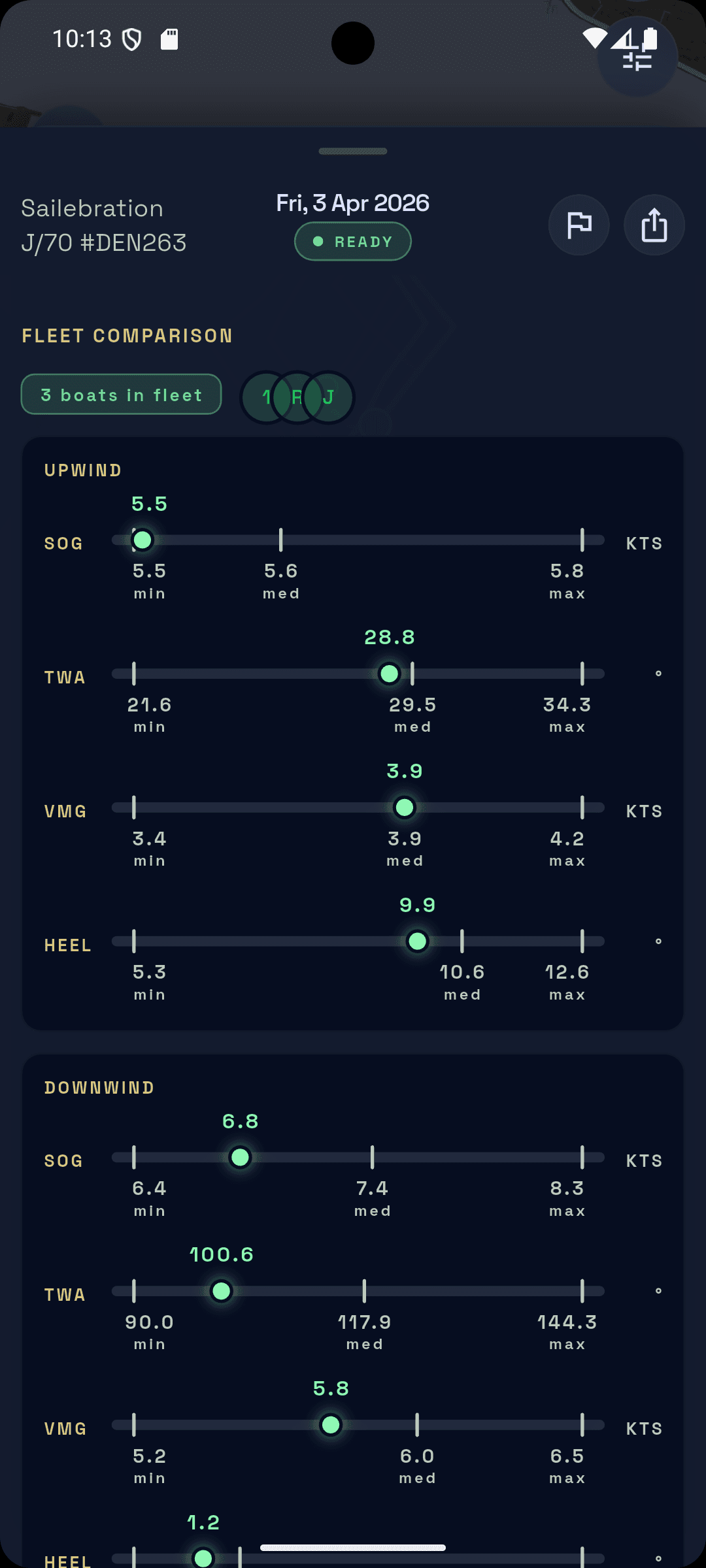
Speed, VMG and the rest sit next to the boats you actually raced, on the same water, on the same day. Each stat shows where you land in the fleet's range; the median is the whole fleet's, not your own history.
What other teams see of you
Everyone in a shared session sees the same race: tracks in replay, finishes and leg splits. Beyond that, the comparison views are designed to limit what one team learns about another — stats are shown as the fleet's median and range rather than boat by boat, and direct boat-to-boat comparison is kept limited on purpose.
Watching it fill in
Every linked boat replays together on the same clock. Results refresh on their own as boats upload — no need to leave the session. Each session also shows how many teams were out with you.
note
A banner counts boats in as they finish processing. Positions can move until the last boat's data lands, so an early leaderboard is a snapshot.
More boats, sharper numbers
Two boats are enough for a real comparison. Every boat after that sharpens the picture for everyone: better mark positions, tighter fleet ranges, a median worth trusting.