How results build themselves
Nobody types in results. Each boat's uploaded track goes into the races SailLab finds at the venue, and the event's Results tab adds them up. Race numbers run across every day at the venue.
Two rules decide what counts:
- Only the event's races. A race counts if teams that joined sailed it or one of the organisers ran it. Another fleet out on the same water stays out.
- At least two boats. A race appears once two or more boats from it have uploaded.
Waiting for the fleet
Results fill in as the fleet uploads and refresh live on screen, so the full picture arrives as the last boats get their tracks in.
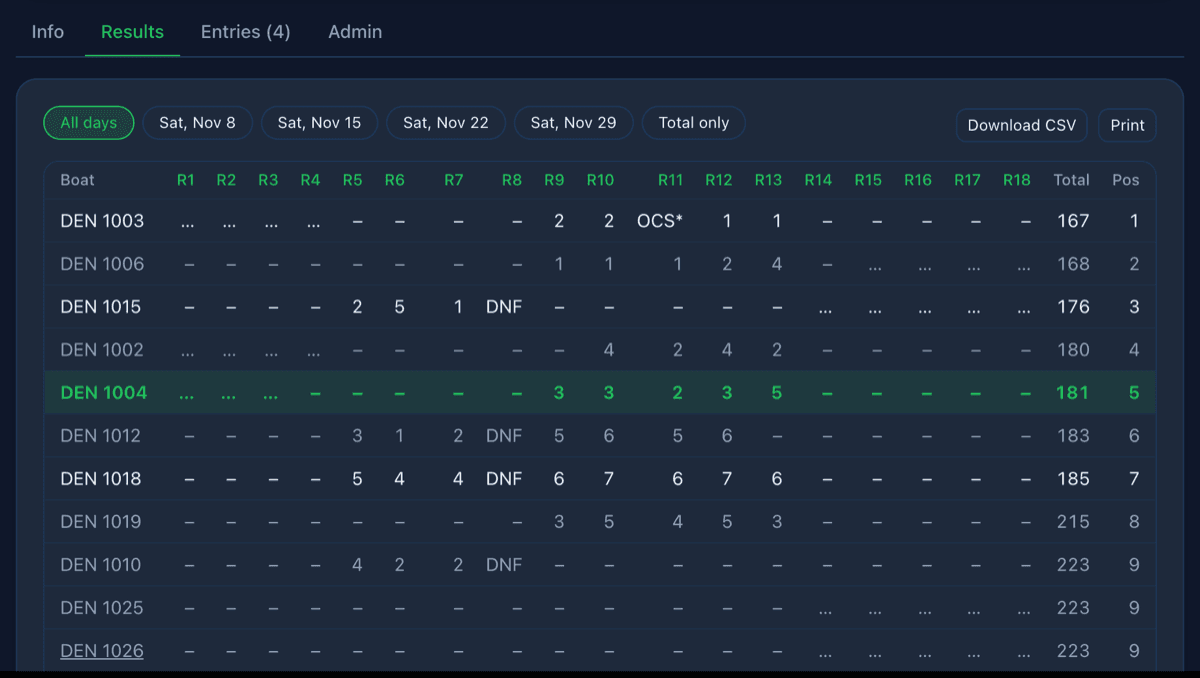
The results table
One row per boat by sail number, one column per race, then the total. The chips above it switch between All days, a single day, Total only and, for a series, Season, the standings across every date.
Tap a team to see only the races it sailed, scored over just those races. Clear the chip to see the whole table again.
Scoring
Results use low points. Organisers choose how a race a boat didn't sail scores:
| Option | A race not sailed scores |
|---|---|
| Boats in the table + 1 | The number of boats in the results + 1 (default) |
| That race's boats + 1 | The number of boats that sailed it + 1 |
| Average of races sailed | The boat's average over the races it sailed |
| Races sailed only | Nothing: boats rank on their average |
Organisers also set Discards, each boat's worst scores to drop. A boat always keeps at least one. Set both when creating the event or in Edit event. On a series they apply to every date.
Corrections
Organisers can fix results in the app or in the browser.
- Penalties: tap a boat's score in a race and pick a letter code: DNS, DNF, RET, OCS, DSQ, UFD or BFD. These score the race's fleet + 1.
- Drop a race: tap the race's header, then Drop race. Count race again undoes it.
- Finish order: tap the race header, then Reorder finishers. Drag the boats into order and save. Use detected order goes back to what SailLab found.
Corrections show for everyone. A corrected score or reordered race has a *, a dropped race is struck through, and a discarded score is in brackets.
Export and print
Tap Export results (CSV) on the Admin tab to get a file you can load into Sailwave. Printing the event page from the browser gives you just the results table.
Sharing results
The event's link and QR code open the event in the app if it's installed. Anyone else can view the results in a browser, no account needed.
Each race also replays with the start line, the start and every boat's sail number. In the browser the results sit alongside the replay. See Races.