Recording as organiser
While an event you organise is running, the Record sheet shows Start as organiser above the usual recording option. Tap it. Your start-line pings and start timer then set the event's line and gun, and your boat doesn't count as a racer.
- A banner, "Recording as organiser of" followed by the event name, shows while you record.
- A recording on a boat with the Powerboat class counts as organiser automatically.
- No team or boat to pick. The recording belongs to you alone: it stays out of your team's sessions and your friends' feed.
- Chose wrong? Open the session's settings and flip Organiser recording. The session reprocesses with the new role.
Afterwards an organiser recording opens a simple page: when and where you ran it, a link to the event, and the races your line and guns set.
The start line and gun
On the Race tab, ping the line ends and run the start timer as a sailor would (see Recording). As organiser, your line and gun become the start of the fleet's races.
- Two boats on the line: each pings its own end. The pin boat pings the pin, the committee boat pings its end, and SailLab combines them.
- Staggered starts: classes starting minutes apart on the same course become separate races.
- Finish line: ping it if it isn't the start line.
note
Races are still found from the fleet's tracks, and a race needs at least two boats uploading. Your line and gun set where and when those races started.
What to log
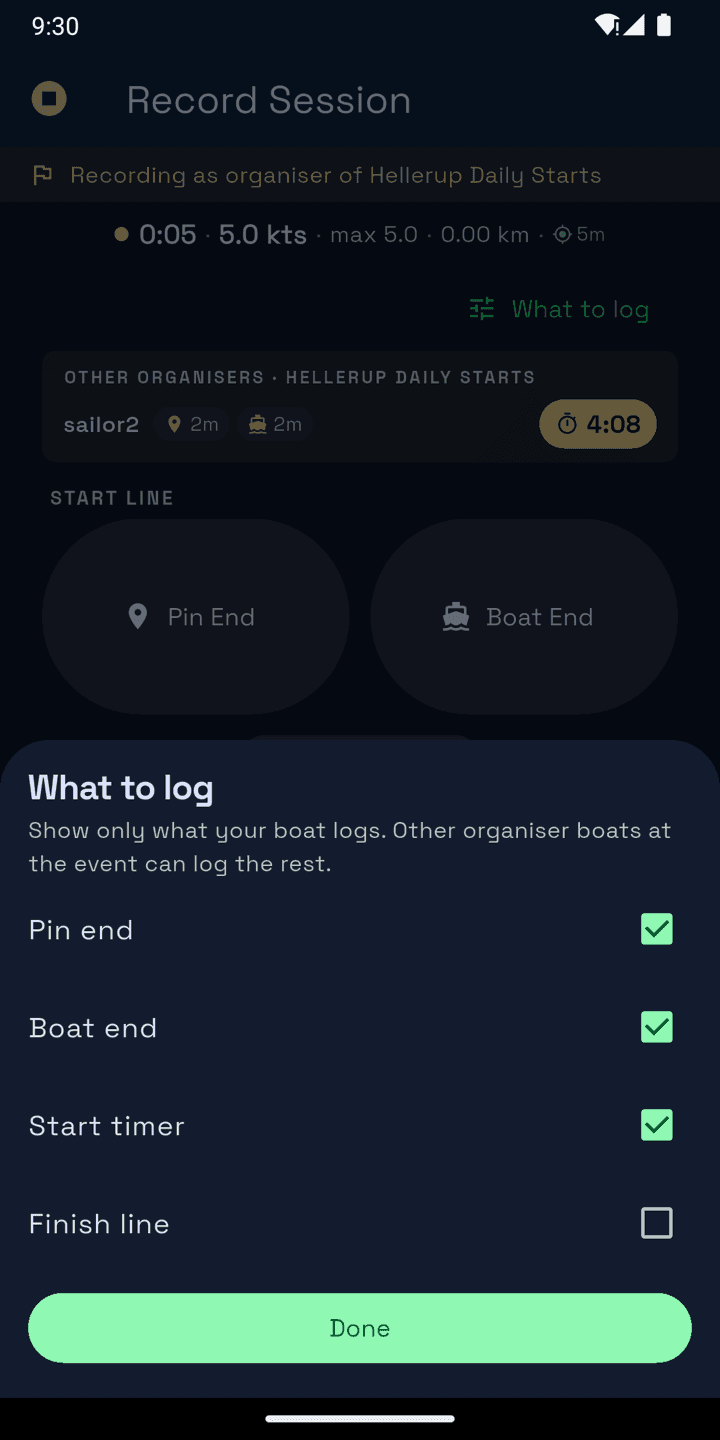
The first time you record as organiser, the app asks what your boat logs: Pin end, Boat end, Start timer, Finish line. Only those controls show, and other organiser boats log the rest. Change it under What to log on the Race tab. Your phone remembers it.
Event settings for race officers
The event owner sets these under Event settings. They cover every date of a series.
- Start timer: everyone sailing or organising gets that countdown (3 minutes, for example) in the app's start timer during the event. Anyone can still change their own.
- Any participant can record as organiser: for clubs where teams take turns on the committee boat. Anyone in an entered team can record as organiser, but can't edit the event.
Live marks
While you're recording at the event, the Race tab shows what the other organisers have pinned and a live countdown to their gun. Entered sailors see the same pins and countdown.
How your start shows in results
Race results show the organiser's version first, with a toggle to Fleet estimate: SailLab's own reading of the start from the fleet's tracks.
At an event only its organisers set the start. A start from a boat with no link to the fleet shows as Unverified organiser and doesn't replace the fleet estimate.
Coaches running start practice get something similar for their squad. See Coaching.